{Latest Update to this Post 4/20/2011} For the longest time, Apple Mac users have been 2nd class citizens in a Microsoft network and application world. With the new “2010” release of products, Apple Macs are finally reaching parity in terms of features / functions / support! Take for example Exchange 2010, Mac users get the same Outlook Web Access capabilities when they use Apple Safari browser as Windows users running Internet Explorer (drag, drop, etc), and same for Sharepoint 2010 Mac users get the same functionality in document libraries, lists, etc as Windows users do.
With the (Sept/2010) release of the Communicator 2011 for Mac client and with the release of Lync 2010 (that replaces OCS 2007 for instant messaging, web conferencing, and VoIP), Apple Mac users now have near feature parity as Windows users. However, I’ve had a heck of a time trying to find “real” information on what works and what doesn’t work, so with my new MacBook Air arriving this week (256m solid state drives and razor thin and super light!), I loaded up Office 2011 for the Mac as well as the Communicator 2011 for Mac software and wrote up this real world experience article. So here you go…
We Mac users now have (nearly full) Apple Mac Client support in Lync 2010 (as well as (mostly) backwards compatible for OCS 2007 R2 implementations)! Microsoft has now made available “Communicator 2011 for Mac” (available for download for Enterprise License clients and TechNet subscribers). This Communicator 2011 for Mac allows for:
- Instant Messaging
- Presence
- Peer to Peer Voice (aka Communicator Voice)
- Peer to Peer Video Conferencing
- Enterprise Voice (aka VoIP Telephony)
ALL of the above functionality is fully supported against OCS 2007 R2 and Lync 2010 just by upgrading the client on the Mac to the Communicator 2011 for Mac client software
Note though that “Live Meeting” support is handled separately from the Communicator 2011 client (Update Dec 22, 2010, see 3rd bullet below for modification of this note):
- Web Conferencing (formerly known as Live Meeting) for Mac users is supported through a separate Silverlight client ONLY to Lync 2010. So for orgs migrating to Lync 2010, Macs will have Web Conferencing access through this Web/Silverlight client and will get audio/video over their Communicator 2011 for Mac client
- This Live Meeting Silverlight client will NOT work against OCS 2007 R2. Mac users wanting to do Live Meeting against OCS 2007 R2 get an existing OCS 2007 Java Web client. This Java Web client for OCS 2007 allows the Mac user to be a presenter or an attendee, but it does NOT provide any audio streaming in a Live Meeting (so Macs against OCS 2007 R2 have to “dial in” to a phone to listen to the Web conference). Because of this limitation, organizations with Apple Macs that do a lot of Live Meetings should upgrade to Lync 2010, install Communication 2011 for Mac on their client systems, and they can then use the Silverlight client for full Live Meeting functionality.
- UPDATE Dec 22 2010!: Microsoft just released Communicator 2011 for Mac v13.1 that now supports Desktop Sharing right within the Communicator client for Mac users (
https://support.microsoft.com/kb/2476505) so Mac users are now able to share their desktops in OCS or in Lync! Note on Desktop Sharing for Macs: While Mac users can now share their desktops, it really is more of a personal peer to peer type sharing where the Mac user is sitting on their desktop, IM chatting with someone, and then offers up to share their desktop with the other person. The Mac user can share their desktop with multiple people, but it’s done real time, meaning that the person gets invited to access the shared desktop right there and then. The Mac user CANNOT schedule the sharing of their desktop in an Online Meeting request. It’s kind of weird, the Mac user can attend a Web Conference, can take control of someone else’s (Windows) shared desktop in a Web Conference (as a “presenter”), the Mac user can share their desktop in an adhoc way with others, the Mac user just can’t schedule a meeting and use their Mac Desktop to share out to others as the key presenter.
Other Notes:
- Orgs with OCS 2007 R2 today with Macs will greatly benefit by having their Mac users install the Communicator 2011 for Mac client (replacing the old Mac Messenger 7.x client) as Mac users will immediately get VoIP support! (assuming the org has OCS 2007 setup for VoIP today (if the org has OCS 2007 R2 for just IM / Live Meeting, the Mac user really doesn’t get a whole lot more with the Communicator 2011 client than they have now with the Mac Messenger 7.x client, so really the focus of the Communicator 2011 client is for VoIP support!)
- Office 2011 for the Mac (the new Word / Outlook / Office software that is now publicly available) includes Mac Messenger 8, however this Mac Messenger 8 client does NOT connect to a corporate OCS or Lync environment. The Mac Messenger 8 will only connect to Microsoft Messenger (the consumer hosted IM). When a Mac user running Office 2011 for the Mac runs the Mac Messenger 8 software, it’ll tell them to go to Microsoft.com and download Mac Messenger 7. Recommendation is that when a Mac user installs Office 2011 for the Mac that they delete the Mac Messenger 8 that comes with Office 2011 and install the Communication 2011 for the Mac. Between Office 2011 and Communicator 2011 clients, the Mac user is fully up to date!
- Communicator 2011 for Mac is NOT available for public download off Microsoft.com and is only available to corporate customers with Enterprise Agreements (downloadable off their software downloads page). TechNet subscribers also have access to this Communicator 2011 for Mac client for download
- For BPOS (Microsoft’s Online “2007” in the cloud service) customers, the Communicator 2011 Client for Mac does NOT work *** Added 1-13-2011 ***
- For Office 365 (Microsoft Online “2010” in the cloud service that leverages Lync 2010 on the backend), the Communicator 2011 for Mac client works just as it works against Lync 2010 on premise!
- *
*** Table added 4/5/2011 – sometimes a table is easier to see things virtually ***
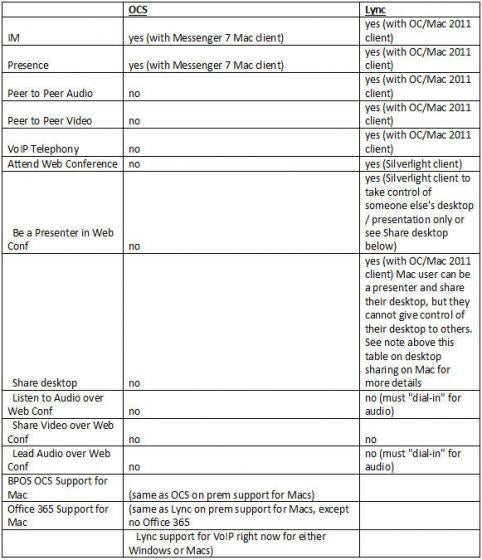
So hopefully this clarifies… Lots of mis-information on the Internet on this topic, so I figured I’d net it all out based on the actual experience of a real Mac user…