
RADIUS didn’t fail — certificate trust did, proving one forgotten root CA can bring modern network access to a full stop.
Anyone who’s spent time in networking knows the familiar world of RADIUS authentication and its protocols like dot1x, MAB and the dance between endpoints, switches and the RADIUS server. A device joins the network (wired or wireless), the switch forwards its request to the RADIUS server, and ClearPass or the switch decides whether it gets in based on the assigned role. Straightforward until it isn’t.
In most deployments, the trust between the switch and ClearPass hinges on two things: the shared RADIUS key and the certificate chain. Recently, our organization rotated all ClearPass certificates, both RADIUS and HTTPSfrom Entrust to Sectigo as part of a root CA migration. We pre-staged the new root CA across 30,000 corporate laptops and mobile devices to ensure seamless post-cutover connectivity. And it worked. Not a single user complaint.
Then, one security camera in Taiwan refused to join after an ArubaOS-CX switch reboot.
Initially, this sounded like a routine auth failure, especially in an environment mixed with ArubaOS and ArubaOS-CX switches. My assumption was simple: if the RADIUS key matches on both sides, DUR (Downloadable User Roles) should work. I wasn’t the original switch configurator, so I didn’t know the full history. The only meaningful clue was the error in show port-access clients interface detail: Invalid certificate.
After multiple TAC cases and digging deep into the documentation by the team, the real culprit became clear: this had nothing to do with shared secrets. The switches were using certificate-based authentication toward ClearPass, and that trust had silently broken. Even more interesting: ArubaOS and ArubaOS-CX handle this trust in very different ways.
ArubaOS vs. ArubaOS-CX: Two different trust models
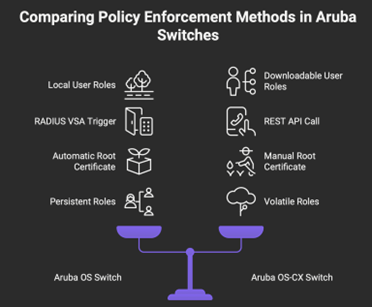
The method by which Aruba OS (AOS) switches and Aruba OS-CX (AOS-CX) switches handle dynamic policy enforcement and authentication differ fundamentally in policy definition, delivery and trust establishment. On the Aruba OS switch, the architecture uses Local User Roles (LURs), meaning all security policies, traffic classes (like HTTP class or cppm) and VLAN assignments (e.g., VLAN 10 for employees) are configured locally on the switch. ClearPass Policy Manager (CPPM) is responsible for the authentication decision and then triggers these local roles by pushing a simple Vendor Specific Attribute (VSA), specifically the HP user role VSA (e.g., user roIl employee), via RADIUS for which name should be an exact match(no typos please!!). The AOS switch must be configured with a “radius service” and enable “Dynamic authorization” (CoA) to trust ClearPass commands
Most importantly, adding the root certificate on the AOS switch is noted as an automatic task, which is a stark difference as seen on AOS-CX.
In sharp contrast, the Aruba OS-CX switch utilizes Downloadable User Roles (DURs), which centralize the policy definition and change the enforcement delivery method entirely. With DURs, all complex role parameters, including VLANs (e.g., VLAN 100, VLAN 120), classes and policies are configured centrally on ClearPass using an extensive GUI. ClearPass generates the complete CLI script for the user role. To deliver this policy, the switch does not rely on a RADIUS VSA trigger; instead, the AOS-CX switch must execute a REST API call over SSL to ClearPass to download the full role script when it is required for an endpoint. Since DURs are downloaded as needed, they are volatile and stored only in memory, being removed upon reboot, which is a key distinction from the persistent LURs used on AOS switches.
To enable this secure API communication, the trust model shifts from RADIUS shared secrets to certificate-based authentication, the switch must have NTP and DNS configured, and the ClearPass root certificate must be manually imported into a trusted anchor profile (pki ta profile) on the AOS-CX switch. Additionally, a dedicated downloadable user role account (e.g., duradmin) must be created on the switch and authenticated to ClearPass with the aruba user role download privilege level, granting the switch permission to execute the download.
This diagram summarizes the difference:
Swaitlana Agnihotri
What actually happened
In our case, all endpoint devices had already been updated with the new Sectigo root certificate, and ClearPass itself was fully migrated from Entrust to Sectigo, so everything appeared aligned on the surface. The issue emerged only where there was port bounce or reboot on these switches, leading for Re-auth again for clients connected. Once ClearPass began presenting the new Sectigo chain, the switches no longer trusted its HTTPS identity as they still had Entrust certificate on them, causing authentication failures. ArubaOS switches were generally able to recover automatically by redownloading the correct certificate after reboot or during RADIUS communication, though a few required the RADIUS configuration to be removed and re-added to trigger a fresh certificate fetch.
However, ArubaOS-CX switches could not recover on their own because they rely on a manually imported trusted anchor, with the Entrust root now invalid; DUR downloads failed immediately after any reboot or port bounce. Endpoints could authenticate at the RADIUS level, but the switch could not download their required roles, leaving them unable to join the network.
Once the new Sectigo root certificate was manually imported into all affected AOS-CX switches, DUR retrieval succeeded and all clients, including the initially affected security camera, resumed normal authentication.
Lesson learned.
This article is published as part of the Foundry Expert Contributor Network.
Want to join?