Lost your Google contacts? Have they disappeared, vanished with nary a trace? Before you start drinking heavily, here's how to get 'em back ...
Last week I experienced true, unfiltered digital horror: My Gmail contacts simply disappeared. I have no idea why but I suspect that it was something to do with one of the many apps I recently tested that link to your Gmail account if you allow them to … alas, I can’t figure out which one it might have been.
Anyway, my contacts were gone, completely. What made this truly frightening was that while I had a backup it was about a month out of date and I’d made a lot of changes since then.
After scratching my head for a while I asked around and, praise be to St. Jude (the patron saint of lost causes), a friend pointed me in the right direction: Google actually has a contact recovery option built-in to Gmail; you just need to know where to look …
Here’s how to use it: Assuming your Web browser is logged into Google you go to: https://www.google.com/contacts. When you get there click on the More menu and select Restore Contacts:
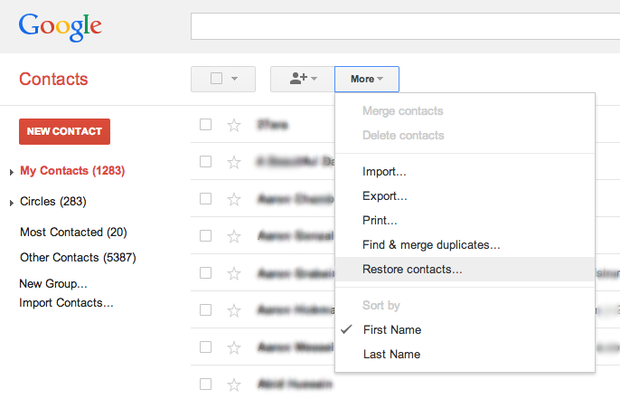 Mark Gibbs
… and then select the point in time you want to go back to; Gmail allows you to return your contacts to where they were at any time in the previous 30 days.
 Mark Gibbs
If you want to get fancy you can always backup your Gmail contacts from your own application or from the command line; the Google Contacts API documentation for this is excellent if you plan to build an app while, if you’re a command line kinda person, you can use a utility such as cURL to do the job; again, Google has lots of helpful documentation including a detailed discussion of how to use cURL.
[mg]