Addison Wesley Professional
The network and the devices and people who connect to it must work as a team if predictable and reliable control is to be achieved. Although many of us are going to have to deal with the legacy hardware and software that has been added to our networks over the course of time, some of us are in the process of designing the networks of tomorrow.
No matter what your present network state, if you make decisions that drive your network toward a closed-loop process control model, you will be in a better position to address the security issues of today and those of tomorrow.
Précis
We start this chapter with a discussion about architecture and how your existing infrastructure can influence your decision on how to integrate CLPC into your enterprise. The question “do you need a forklift?” is discussed, as are some interesting alternatives to a complete reworking of your network.
We then move to a discussion about how the vendor community supports endpoint security and integrity. We discuss who some of the players are and what their strengths and weaknesses are.
Making a decision about permitting or denying access to the network without some form of remediation is clearly a nonstarter, so we discuss vulnerabilities and some remediation technology.
Special Points of Interest
The discussion regarding what a vulnerability is seems to have sparked a vigorously contested set of definitions. Although this is a subject worthy of much discussion, we are going to take a pass on it for now. In this chapter, we use the term vulnerability to mean a way to attack the endpoint and the network.
We expand the definition of authentication a little bit to encompass the operating system and associated applications. This is key to the CLPC concept because trust is measured against a stated policy.
We’ve tried to solve this problem on the network and at the endpoint. Vendors, depending on their product, pick a direction and work from it à la Cisco and Microsoft. The plain fact of the matter is that the network needs to help the endpoint, and the endpoint needs to help the network. Only through this symbiosis can we provide the requisite controls needed to build a CLPC.
Architecture Is Key
When we start any design process, prudent engineering tells us that we should start with some basic assumptions that will drive our architecture. When we go down a specific architectural path, changing our minds or changing the basic assumptions usually means making compromises that reduce the effectiveness of our intended design.
There are three ways to architect our control solution. One is based on industry standards, and two are based on proprietary solutions offered by the leaders in their respective lines of business.
Cisco is a networking vendor that is trying to control and protect the endpoint, and Microsoft is an endpoint solution vendor trying to use parts of the network infrastructure to add security.
Some vendors, such as Juniper (through their Funk acquisition) and Symantec (through their Sygate acquisition), have expanded the capability of the 802.1x supplicant beyond simple authentication, and this is where we begin to see the foundation for a real proportional control standard that truly closes the loop.
These new products, such as Symantec’s Enterprise Protection,1 go beyond checking the endpoint to ensure that system-level policy issues have been complied with prior to allowing the system connectivity with the network. They also add some protection to the system that ensures that it’s capable of protecting itself and the data it contains.
Basics
To make CLPC work, you need to have an infrastructure that supports it. You have to have some mechanism that enforces your policy; otherwise, it’s a voluntary participation model.
You can work from two basic choices if your intent is to actively enforce your policy: 802.1x and Dynamic Host Configuration Protocol (DHCP). Of course, you can realize a passive type of policy enforcement through compartmentalization. The downside of compartmentalization is that it adds complexity to your network architecture, and complexity means the increased possibility of failure. More on compartmentalization later.
How Old Is Old?
So, let’s assume that we’re going to use 802.1x as our enforcement mechanism. We’ve gone out and bought a product that supports our notion of CLPC and have installed the agents and supplicants on our endpoints.
Having clients that support 802.1x is great, but you also need the network infrastructure to support it. Much, if not all, of the older infrastructure doesn’t support 802.1x. An easy way to tell is to look at when you bought your network equipment. If you bought your stuff before the days of wireless, you don’t have the ability to do 802.1x. If you’re lucky enough, you may be able to upgrade, but it’s going to be expensive.
During the course of my day-to-day business, one of my clients, a major financial institution, did a survey of their equipment and determined that it would cost more than a million dollars to upgrade their network to the point where they could support 802.1x.
Oh, and there’s all those pesky embedded systems that we look at in Chapter 12, “Embedded Devices,” such as printers and respirators, that don’t speak 802.1x (or antivirus for that matter) that still need to be addressed.
Compartmentalization Is Still Effective
As you work through the pains of designing a new network architecture, you realize that the real fun is going to start when you begin the cutover. Few of us have had the opportunity to build a brand new network from the ground up. You usually have to transition from the old architecture to the new one in some controlled manner. This transition represents a huge problem for mergers and acquisitions people.
This is where compartmentalization can be utilized as a migration tool as well as a security tool. By placing security gateways between your enforced network and your legacy network, you can reduce the security risk to your entire network. Notice that I didn’t say “eliminate”; I said “reduce.”
But how do you compartmentalize? Do you do it based on the classification of systems and data, or should you break your network into functional zones? It makes a difference, especially if access from zone to zone is managed by access control lists (ACLs) in your routers or firewalls. Making the incorrect choice can mean that the business processes are impacted in significant ways.
For example, Figure 5-1 depicts a basic method of compartmentalization that is predicated on use. It is the classic concentric architecture. The users from the Internet have limited access to extranet services based on business needs and requirements. The dotted line surrounding them suggests a certain level of porosity that must be tolerated with such a service. However, when you get to the corporate network perimeter, you’re greeted with a classic firewall, antivirus (AV), and intrusion detection. Moving to the intranet services, we encounter some access controls that limit how we interact with the supplied service. We might not have write access, and the service might not be available to all areas of the network.
The user area of the network is our next layer. It will have access to the Internet, intranet, and possibly the extranet. It will also have limited access to critical internal services. Critical internal services are protected by access controls such as ACLs, authentication, and authorization services. In the Windows world, these controls are enforced using Active Directory (AD) and groups. In non-Windows worlds, this means Remote Authentication Dial In User Service (RADIUS) and Lightweight Directory Access Protocol (LDAP).
The downside of this architecture is that it is fairly promiscuous, and if you’re not up-to-date with your AV data files or you get hit with some zero-day exploit, you’ll have quite a bit of damage to address.
At the other end of the spectrum is a method used to compartmentalize your network that is based on carving it into containment zones, as shown in Figure 5-2. By creating numerous zones and controlling all communication between the zones through the use of a firewall, you hope to prevent the spread of viruses and control the movement of data.
Figure 5-1
Classic compartmentalization by use. Core infrastructure systems are heavily protected and managed.
Unfortunately, the underlying message is that you don’t trust your endpoints or the people who use them. You don’t trust the endpoints to protect themselves, which implies that you don’t have much faith in your security program. I can understand the “belt and suspenders” approach, but the rules, ACLs, and complex procedure that must be in place to support them begins to look like a ripe place for errors and failure.
As you can see from Figure 5-2, each zone has a firewall and therefore a firewall rule-set associated with it. You must explicitly allow traffic to leave a zone, and you must explicitly allow traffic to enter a zone. That means that if you want the folks in User Zone 1 to be able to access Corporate Services, you must tell the User Zone 1 firewall to allow traffic to pass outbound, and you must tell the Corporate Services firewall to allow the inbound traffic. I know what you’re thinking: “The firewalls allow all outbound traffic by default.” The firewall will allow outbound traffic unless you don’t trust the systems on the inside and you configure the firewalls such that they stop all traffic by default. Remember that one of the purposes of such a design is to prevent the spread of viruses.
It’s been my experience that such a zone-based architecture can become overly complex fairly quickly if not managed properly. It’s easy for this type of architecture to develop a life of its own and in the process become quite a nightmare for the users and the security team. I’ve seen examples of this architecture where every change to the network required security group approval because a firewall rule change was necessary. This created quite a bottleneck. A special group had to be created just to address the changes to the firewall that were required on a daily basis just to keep the business going. The result was the inability of business groups within the organization to innovate at the speed of business.
Figure 5-2
Zone-based compartmentalization can grow to be very complex.
Another victim in a complex zone-based architecture can be service level agreements (SLAs). SLAs are there to ensure that a basic level of functionality is always present so that business can be processed. SLAs ensure that file servers are always running with minimum delays and that Web services provide their proscribed function to your user community. In a complex zone-based architecture, the tools required to measure and gauge service levels can be severely hampered (if not completely cut off).
To be fair, this type of architecture usually results from numerous mergers and acquisitions and the requirement that the security people have to manage the overall security of a patched-together network. I guess that means that it’s the financial guys’ fault that the network is overly complex.
I will concede that compartmentalization, if done properly, is also an effective tool for controlling the spread of malware. It gets back to the question I asked before, however: Do you want to compartmentalize by data classification or by function? If you’re a government agency or the military, this question already has one answer: You’ve compartmentalized by data classification. This seems easy enough until you need to connect services or share data between classification zones. As shown in Figure 5-3, the Bell/LaPadula rule states that you can have no “write down” and no “read up” capability.2,3 What this means is that systems with a higher classification can’t write data to a lower classification system nor can a lower classification system read from a system with a higher classification. If you consider your network a “higher” classification level than the Internet, you break that rule every time your email server receives email.
Figure 5-3
The Bell/LaPadula rule prevents the migration of high classification data to lower classifications.
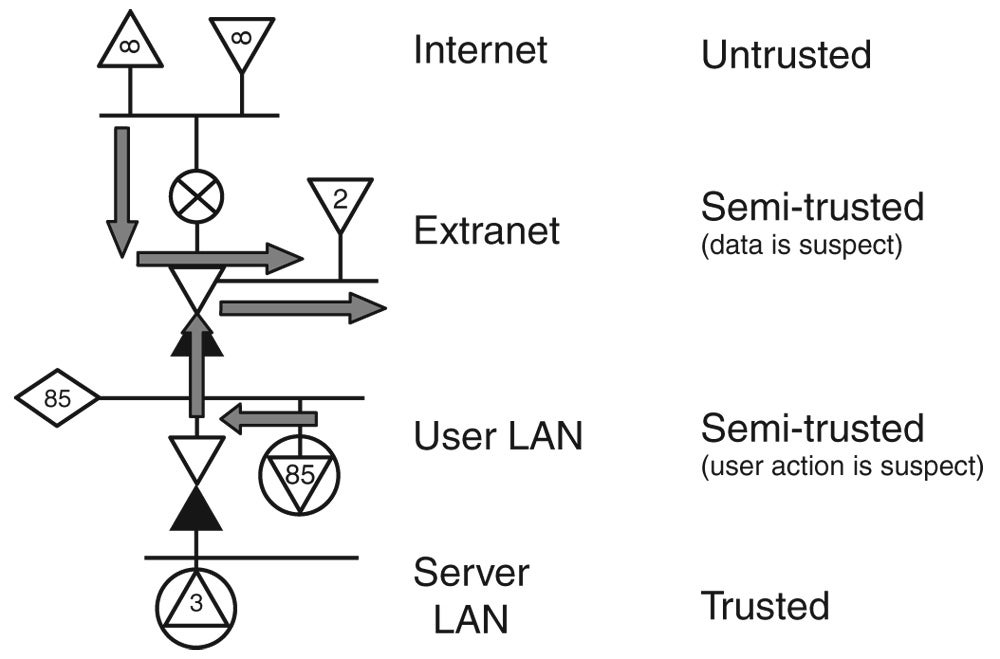
There must be some middle ground, and I believe that is to compartmentalize by function and monitor traffic patterns. We have seen this type of compartmentalization in our demilitarized zone (DMZ). We put systems that act as data bridges in our DMZ so that external users can access the data while not getting access to the internal network services. We even give it a fancy name and call it an extranet.
Some security architects take this idea a bit further by breaking up the network into smaller compartments—not as extreme as a zone-based architecture, but not quite as open as a classic security architecture. As you can see in Figure 5-4, a logical demarcation point is the difference between user endpoints and server endpoints. This segregates endpoints based on their function as sources and sinks of data.
The extranet allows Internet users to exchange data with internal users.
The added advantage to this is that you can track flow information and when it looks like a system has changed roles—a sink becomes a source, for instance—you can take appropriate action. An example of this is a user’s system spewing data to the Internet. It’s either been hacked and is spamming the universe, or a large amount of data is being extracted from it.
I will take this opportunity to remind you that it is for this reason that our endpoint icons are triangles. If the pointy end is connected to the network, this is a source of data and network traffic, such as a file server. If the flat end is connected to the network, it is a sink of data.
There is a third possibility: that the identified endpoint is being remotely accessed for legitimate purposes. I would counter that if you have a network with any sensible level of restrictive policy, chances are that you’re not allowing remote access to ordinary desktops.
Do I Need a Forklift?
As I pointed out earlier, not all network infrastructure devices can support your decision to rely on 802.1x. As our networks have grown and expanded over the years, most of us have accumulated different vendors and different versions of each vendor’s equipment. Not all of them are going to have the same capability. Add to that the fact that there are hundreds of thousands of “dumb” switches (or worse, simple hubs), and you begin to see how the problem can get out of hand quickly.
Some of us are going to have to rip out and replace a lot of equipment.
Upgrades Are Expensive
Hardware vendors love change. Change means that they get to sell more hardware! When people stop buying new hardware or upgrading the hardware they have, the “network iron” companies are going to go out of business. We saw this happen when the “bubble” burst. Folks were waiting on the “killer application,” and in anticipation other folks went crazy installing lots of fiber and infrastructure. One day someone woke up and said, “Hey, we have a lot of dark fiber out there and no killer application to fill it with bits. Maybe we should stop buying stuff.”
Stall, spin, crash, burn, die.
The resulting crash didn’t really lower the price of equipment, unfortunately. My most recent data on this comes from a financial customer who was planning on upgrading to all 802.1x-capable devices. He called his network hardware vendor in for a chat and told him what he was planning on doing. The vendor told him that all his hubs would have to be replaced because 802.1x only allows one connection per port and each new connection would need authentication and would kill the last connection. Most users would classify that as “bad.” Some of my friend’s switches were a couple of years old, and they didn’t have the memory capacity for the new code; and because they were so old, they couldn’t have more memory added. They would have to be replaced. However, a good number of the switches could be upgraded and would have to be to support the 802.1x-capable code. Yay! Now, you probably need some professional services people to help with such a huge upgrade. After all, a lot of details and configuration changes need to be accounted for. Oh, and he needed a “good solid project manager” to pull all those PS people together. By the time it was over, my friend was looking at a $2 million plus, one year to complete, “you get to keep the forklift” upgrade.
Let’s not mention the time and potential for disaster as far as the user is concerned. New devices become the excuse of choice. “Because your fill-in-the-blank burped, I missed my delivery date!”
The good news is that he was able to convince his board that it was more important to be a leader in the security space than tomorrow’s headlines, and they’re well on their way to implementing a CLPC-enforced network.
A Less-Expensive Way
So, you don’t want to help your local network rep make the payments on his shiny new BMW? There is a cheaper way. It’s not as effective, but it does work. I say “it’s not as effective” because it relies on voluntary participation.
Instead of relying on the switch to make the decision, you can use the fact that Internet Protocol (IP)-based endpoints use the IP address and its associated subnet mask to accept traffic. You can use this to your advantage in a kind of bastardized implementation of the IP protocol. By using DHCP, you can control if and how an endpoint talks to the network. This works because switches operate at Layer 2 and routers operate at Layer 3. By using switches to make connections between individual endpoints based on Media Access Control (MAC) addresses and by using the routers to control how networks communicate using the IP address, you can gain a great deal of control over all the endpoints on your network.
Let’s take a look at how this works by starting with the DHCP protocol. The Dynamic Host Configuration Protocol,4 DHCP for short, evolved out of the Bootstrap Protocol (BOOTP) that was used in the early days of the Internet. DHCP is backward compatible with BOOTP and supports the idea of a lease. Instead of being given an IP address in perpetuity, DHCP lets you use the IP address only as long as the lease is valid. When the lease expires, the DHCP client on the endpoint “releases” the IP address back to the DHCP server.
If your endpoint isn’t configured with a static or fixed IP address, it’s usually set to ask a DHCP server for an address. You usually get your first DHCP lease when the endpoint first joins the network, but there are other times when you can get one. Many operating systems come out of the box with the network configured to talk to a DHCP server.
The complete protocol exchange is fairly elegant. The requesting endpoint sends out a broadcast packet with a destination address of all 1s and a source address of all 0s. A listening DHCP server responds with a packet that has the IP address, the subnet mask, the default gateway, the length of the lease, and at least one DNS server, as shown in Table 5-1.
Table 5-1 A Simple DHCP Network Scope
Parameter | Setting |
|---|---|
IP address | 192.168.168.21 |
Subnet mask | 255.255.255.0 |
Default gateway | 192.168.168.1 |
Duration of lease in seconds | 7200 |
DNS server | 192.168.1.25 |
It can send more information, especially if you’re a Microsoft endpoint, but we’ll stop at this level of detail because this isn’t a book about the DHCP protocol. After the endpoint has received the IP address information, it sends a message back to the server acknowledging that it’s going to use the address.
Using the information in the table, we can see that our endpoint is now equipped to access the network for two hours. When two hours is up, it will have to ask the DHCP server again for an address.
So, why is this cool, and how can we use it to our advantage? To start, it’s cool because most of us are lazy and DHCP makes it easy to support an IP-based network, because you don’t have to configure static IP addresses and mess around with all the information that goes with them. Each time you touch an endpoint is an opportunity to screw it up, and you eliminate that with DHCP. The downside is that if you misconfigure the DHCP server, you can really “screw the pooch” for all of your users.
How can we use this to our advantage? Easy, most DHCP servers can manage multiple scopes. A scope is a geek term that defines each set of parameters for each set of IP address ranges that the DHCP server will be giving out. One scope may say that the IP address range has the parameters depicted in Table 5-1, whereas another scope has the parameters defined in Table 5-2. In Table 5-2, the top scope serves as the remediation scope; the bottom scope allows connections to the production network.
Table 5-2 Two DHCP Scopes
Parameter | Setting |
|---|---|
IP address range start | 192.168.168.2 |
IP address range end | 192.168.168.31 |
Default gateway | 192.168.168.1 |
Subnet mask | 255.255.255.224 |
Duration of lease in seconds | 7200 |
DNS server | 192.168.1.25 |
IP address range start | 192.168.2.2 |
IP address range end | 192.168.2.127 |
Default gateway | 192.168.2.1 |
Subnet mask | 255.255.255.128 |
Duration of lease in seconds | 14400 |
DNS server | 192.168.1.25 |
Scopes are usually associated with networks, but this can be worked around with third-party software, hardware, or magic.
If you figured that one scope was for a trusted network, and the other was for an untrusted network, you understand what we’re trying to do here. When an endpoint starts up, it gets an address in the untrusted or quarantined network. When it can prove to the DHCP server that it can be trusted, the DHCP server gives it an address in the trusted enterprise network.
The magic part has to do with how routers handle DHCP requests. Because a DHCP server might not be on the same network segment as the client, the router has to tell the DHCP server what network the client requesting the DHCP request lives on. So, when a router sees the DHCP request, it appends what network the packet came in on to the packet. The DHCP server uses that information to decide which scope to serve an address from. DHCP enforcement uses that to select what network the endpoint is going to be assigned to. The network access control (NAC) client appends compliance information, the router appends network information, and the information is taken apart and sent to the DHCP enforcer/server. There are multiple ways to do this, and it depends on the vendor what method is used. It could be a change to the DHCP software, or it can be a proxy server in front of the DHCP server.
Why does this work? Because routers can support multiple IP address ranges on their interfaces, thereby allowing routable and unroutable IP address ranges on the same network. For that matter, if a router doesn’t know about an IP address range, it would look like spoofed addresses and drop the packets. Instant containment! In Figure 5-5, the endpoints inside of the dotted box will not have access to the rest of the network because their IP address won’t be passed by the router.
Figure 5-5
DHCP enforcement. Through clever use of proxies and routers, DHCP NAC enforcement provides containment.
Now that we’ve looked at why DHCP works, let’s consider why it doesn’t work. It’s voluntary. If I decide that I’m going to manually assign an IP address from an observed list of IPs, I can defeat DHCP enforcement. You should consider DHCP a migration mechanism, but completely relying on it probably isn’t the best idea in the long run.
Technology Promises and Futures
Technology got us here, and technology is going to save us. I can prove it! Technology has been getting us “here” for the past 50 years. Since the first computer, technology has been promising us a better future, and it’s going to save us sometime real soon. Any moment now technology is going to ride up on a big white horse and save our butts. I’m not holding my breath, however.
Just as technology provides a savior, technology will also provide three new adversaries. We’ll add enforcement to our solution, but like a water balloon that you squeeze in the middle, our problem will pop out somewhere else. If we continue to treat technology as a series of point solutions designed to solve our problem of the moment, we’re going to be disappointed for a long time to come.
So, what does the future hold? Not much if we don’t change our ways. We can’t continue to let the vendors drive our solutions through marketing and the threat du jour. The future of security is hinged on turning it into an engineering domain complete with processes and postulates. From these postulates, we will be able to craft specific tests, run the tests, analyze the test results, and see whether they agree with our postulates. If they do, we’re one step closer to better security. If not, we can reexamine and reformulate our postulates.
We can set some milestones, but when we get to them, we need to be ready to move on to the next one. As we secure our environment, we need to turn our attention to the data that we’re generating.
In the previous paragraphs, we talked about compartmentalizing our networks to protect them. One of the methods was the compartmentalization of the network based on the data classification. Using our present operating system architectures, that’s about all we can do. We don’t have labels, and we can’t make decisions based on the classification of the data. Sure, third-party data protection solutions do exist, but they’re bolt-ons and as such aren’t a part of the consideration put into the operating system.
Endpoint Support
How well our solutions work is going to be based on vision, simplicity, and common sense. Each endpoint is going to have to receive a different kind of support because each endpoint type has a different user profile associated with it. Some endpoints, such as our industrial controllers, don’t have users per se; they have “actors,” such as “bots.”
Authentication
Authentication used to be about identifying the user. In recent years, the definition has expanded to encompass the system to a certain degree. Through the use of certificates, you can be fairly certain that you’re really talking to the server that you intended to talk to.
The Trusted Computing Group (TCG) has expanded the authentication mechanism such that it now includes the hardware. This is a great thing because it should reduce the incidence of notebook theft in the future by making it easier to trace (and therefore harder to sell) the stolen property. However, it should be said that all the Trusted Platform Module (TPM) really is, is a secure place to store keys and certificates. As we are so painfully aware, each security solution that we’ve come up with in the past has been bypassed or otherwise broken, thereby keeping us on the wheel of pain.
For the purposes of CLPC and NAC, we’re going to include a trust element in our authentication protocol. This trust element will include a determination regarding the state of the endpoint. In short, it will examine whether the endpoint meets a preset level of compliance and thus an implied level of trust.
Vendor Support
As I’ve said, there aren’t a lot of options out there to help with integrating our endpoints and our networks. We’re counting on NAC (in whatever form) to help, but vendors are working to get into the market. A bit of a warning here: The following information was accurate as of this writing. Vendors change directions fairly quickly, and although there are the expected offerings from Cisco and Microsoft, both pushing their respective solutions, this could change the day after publication.
Hardware vendors such as Enterasys, Foundry Networks, Extreme Networks, and Juniper Networks presently provide some, if not all, parts of the solution.5 Juniper bought Funk and the Steel Belted Radius product line; and with that, combined with their existing product line, they seem to offer something that has everything except endpoint integrity compliance.
Enterasys literature shows them doing a remote scan of the system, and they claim that their agent solution, Trusted End-System Solution, works with their other products that manage policy and authentication, authorization, and auditing (AAA).6 A deeper look into their products indicates that Enterasys relies on Sygate (now Symantec) and Zone (now Check Point) agents to check integrity.
Foundry has taken the same approach that Enterasys has—not too strange considering Foundry is a hardware vendor.7 To make their solution work, you need a good agent on the endpoint, and that means Symantec or Check Point. The combination of Foundry and Symantec is a solution that I’ve personally seen work. It took a bit of work to get the remediation part to work because it had to have some custom scripts, but it did work.
Extreme has also teamed up with another vendor (in this case, StillSecure) to provide a multitude of NAC solutions.8 They claim to provide agentless testing through the StillSecure Safe Access solution. This process uses Windows Remote Procedure Call (RPC) and credentials to interrogate the endpoint, so each endpoint must be configured to accept StillSecure access to accomplish testing. Your endpoint firewall will have to be configured to allow this type of access. Thankfully, we haven’t seen any buffer-overflow vulnerabilities in RPC that allow an attacker to execute arbitrary code since late 2003.9 But, if using Windows RPC makes you nervous, you can always use the browser-based ActiveX tool! If you want to avoid the remote execution of code that MS06-014 says is possible (unless you patch “at the earliest opportunity”),10 however, you can always use the StillSecure agent.
Symantec now has a NAC offering thanks to its purchase of Sygate. The Symantec Sygate Enterprise Protection (SSEP) solution is an agent-based solution that leverages 802.1x (an additional module), DHCP, or network compartmentalization. The agent is capable of doing self-enforcement, thereby eliminating reliance on 802.1x or DHCP. However, a basic rule of security is that if you can put your hands on it, you can break into it. Self-enforcement is a last resort if you have no other options and you don’t have a very sophisticated user community. SSEP does have an integrity component that ensures that the system has the required software and patches and actively prevents malware from infesting the machine. Operating system protection examines how system calls are made; if they exhibit unknown behavior, the call is terminated.
The Symantec/Foundry combination is also a solution that I have seen work. By using the 802.1x capability of the Foundry FastIron switch, noncompliant endpoints were switched to a remediation LAN where they could be repaired. SSEP provides remediation services as well as interfacing with third-party remediation and patch-management products.
Check Point Integrity has a similar set of features with respect to NAC, but it wraps VPN support and integration with other Check Point security products into the mix. Integrity also has an endpoint integrity option that can be used to evaluate the security state of the endpoint and, if needed, initiate remediation actions or quarantine.
Cisco and Microsoft, as of this writing, have yet to completely deploy their solutions. They seem to have a good set of visions, but the implementation side is a bit slow.
Infoblox11 is an interesting solution because it’s a toolkit that only addresses DHCP-based NAC. Let me draw an analogy here. You walk into a pet shop and ask for a dog. The clerk asks, “What kind of dog do you want?” Check Point and Symantec products are kind of like that pet shop. Do you want DHCP, 802.1x, compartmentalization, or do you want a mutt? On the other hand, you can walk into a pet shop, ask the clerk for a dog, and the clerk can hand you some DNA and tell you that you can make any kind of dog you want. Toolkits are like that.
Vulnerabilities and Remediation
As mentioned earlier, an incredible industry is devoted to just identifying and classifying vulnerabilities on your network. Companies such as Qualys and nCircle have successfully implemented a business model that feeds on vulnerability detection and analysis.
I suppose that I should be clear when I make this next point because I’m about to poke some folks in the eye with a stick. The marketing model for the vulnerability assessment (VA) industry is predicated on two things:
Eliminating exposed vulnerabilities will make you secure.
The scan, repair, scan model is effective.
I submit that there are more problems with this “hacker’s eye view” than vendors would lead you to believe.
First, your network is changing faster than you can scan it. At best, a scan is a snapshot of a very quickly moving set of scenes. Imagine trying to figure out what a movie was about by looking at every ten thousandth frame!
Second, the mere act of scanning a network can create problems by itself. If you have any kind of intrusion detection software, it’s sure to alert on the fact that the endpoint is being scanned. Sure, you can add exceptions to your network-based intrusion detection system (NIDS) and your host-based intrusion detection system (HIDS), but you have to do that every time your scanning source changes. Even with that, some applications don’t like being scanned and may behave by crashing or slowing down to the point where service levels are affected.
Third, although they can be configured to, these scans don’t scan every port. They only scan a comparatively small number of ports. If someone wanted to hide an illegal application, it wouldn’t be hard.
Scans are also insensitive to where the endpoint is on the network. A vulnerability is a vulnerability.
So why scan at all? Well, a simple answer to that is that it helps an organization meet the regulatory requirements of outside assessment. Sarbanes-Oxley (SOx) is a perfect example of this. You can have the best security in the world, but you still need an outside assessment to fill a check box. Am I opposed to outside assessments? No, I’m not. I just think that if you’re going to spend your money, there are better ways to spend it. Get an occasional scan, but be careful how much you pay for it. This type of service is now a commodity. And remember that you still have to remediate what you find at some point in time.
Detection
Now that I’ve completely bashed the VA market, we can talk about how to detect vulnerabilities in your endpoints. You can use a couple of methods to detect vulnerabilities. The first I talked about in the previous pages: You can scan and hope for the best. But as I discussed, scanning does have its downside. Besides the reasons I mentioned before, I believe that scanning is reactive and inaccurate.
Another, and I believe more effective way, is to keep track of what’s added or removed from the endpoint. If you know what’s on the endpoint, you can compare that to a known list of vulnerabilities and make a determination of risk and exposure.
That means that you have to have access to the endpoint either through a smart agent that provides an inventory function or via a remote protocol.
Another way to do that would be to install inventory software that keeps track of what software is loaded on the system. It doesn’t operate at the frequency that NAC requires, but it does give you some feedback as to what’s living on your endpoints.
Vulnerability Tracking Services
Multiple services track vulnerabilities, and you can use that information to check your endpoints for vulnerabilities. Most sites use a naming format called the Common Vulnerabilities and Exposures, or CVE, to name their vulnerabilities. CVE allows publishers of vulnerabilities to use a common dictionary of terms in the hope that it will allow us to more effectively communicate. You can find these databases as follows:
Secunia, https://secunia.com
SecurityFocus, https://www.securityfocus.com
NIST, https://nvd.nist.gov
Vulnerability Management
So, what’s the difference between vulnerability management (VM) and vulnerability scanning? Commitment to the process. VM is about taking information that you have about the state of your endpoints, their vulnerabilities, and understanding what type of mitigation to employ. Once again, there is a subtle tone to what I’m trying to say here. Just because you have a vulnerability doesn’t mean that you have to rush out and install a patch. VM is not blind faith in the ability of vendors to perfect their offerings. It’s about understanding how the vulnerability, potential exploits, and your business processes intersect to form a workable solution.
VM is based on a process that constantly reassesses your vulnerability posture while applying controls to ensure that business objectives are appropriately met. You can use the scan, evaluate, assess, prioritize, implement, verify cycle as a basis for your process. Most of us recognize this as the basic test, analyze, fix process, albeit with some needed controls to ensure success. As you read the next few paragraphs, use Figure 5-6 as a reference.
Scan. Using either the hacker’s eye view of a VA scanner or the system owner’s view of an agent or inventory control tool, generate a list of your vulnerabilities based on all your installed software.
Evaluate. Determine your level of exposure based on available exploits and proximity to attack. What is the risk of the exploit being used successfully against your vulnerability? Does the vulnerability have any nasty interactions with other vulnerabilities? What is the proscribed course of action?
Assess. Determine how the patch or fix is going to impact your production processes. Is the patch going to require the rewriting of custom code? Does the fix really mitigate the vulnerability? Is the fix worse than the risk?
Prioritize. Determine which systems are going to get your critical resources based on their value to the organization, risk of successful attack, and ability to act as a jumping-off point.
Implement. Install the patches, change the procedures, or remove the offending object. It could be code, as in the case of Windows needing a patch, or it could be a case of something like a Napster, which needs to be removed. Or, as discussed in the section “Penetration Testing,” it could be that a procedure has to be changed.
Verify. You need to ensure that the dictated remediation has been accomplished. This could be a rescan or it could be an audit. For that matter, it could be a full-up penetration test. At any rate, you need to verify that the fix really has been implemented. I recommend that whatever process you use that you keep the verification out of band, or outside of, the normal VM process. This will act as a check and balance to your overall VM process.
Start again.
Figure 5-6
The VM process defines a set of procedures that discover and manage vulnerabilities in a network environment.
Remediation
Painless. Transparent. Those two words, in my opinion, accurately describe the two most important qualities of a remediation process. Sure, remediation has to be reliable and accurate, but remediation has to be painless or transparent; otherwise, people will find ways around it. If it’s too restrictive or time-consuming, remediation will be viewed as “one of those productivity-sucking security processes” and will eventually get bypassed by management at crunch time.
When AV first came out and files were quarantined such that the email admin had to release them, people went around the process by copying files to floppy disks (remember those?). The viruses of the time still spread because people just afforded the malware a different carrier via removable media. The AV vendors had to include a new feature that allowed the AV engines to scan floppies. And thus, the typical weapons escalation profile continues.
To address this problem, some vendors have built what they call “automated” remediation tools. The notion is that when the user connects, a determination is made regarding the user’s patch level. I say “patch level” because most of the remediation vendors are either in the vulnerability management space or the patch management space.
Penetration Testing
Let’s start this section by saying that social engineering is a method of circumventing technology controls through the manipulation of people. We’ll get back to this in a few paragraphs.
It is the goal of penetration testing to see how resistant your enterprise is to attack. The process starts by learning about the target. So you start by asking a few simple questions:
What does the target do; what is their business?
What is the target’s threat profile?
Does the target rely on network technology?
From these basic questions, many more can be asked, but you really need to start from there.
By finding out what the target company does, you learn more about how the company is organized and what business processes they’re going to have in place. Business processes can be attacked.
A bank is going to have a different threat profile from that of a car dealership. Because banks deal with currency and funds, you can skip a great deal of risk (as an attacker) by going for the money rather than the painful and labor-intensive activities required to sell or to part out a stolen car.
If you have a bank and the bank relies heavily on the Internet for account transfers or funds management, you have a remote target. Once again, our car dealership is going to rely on the Internet for fleet orders, customer inquiries, and the occasional car sale. Really big thinkers are going to find some way to manipulate the system to have cars delivered to some fictitious business where they can be “disappeared.” However, even that doesn’t come close to being in the same league as a financial institution. Different businesses, different threats, different return on, well, nefarious investment.
While someone on your team is off finding out about business profiles, someone else from your team has done some research and discovered that the target has a network assigned to it. So, what is the next step? To scan it, of course! Let’s get the low-hanging fruit out of the way and see whether they have any endpoints that we can touch from the Internet. That means a scan. The very same kind of scan that an organization is going to do in the course of a VA scan.
Now we come to the conclusion that there is no low-hanging fruit, and attacking the technology directly isn’t going to work. So what do you do? You attack the people and the processes that they rely on to get their jobs done. Chat with some employees and get the help desk number. With a little more ingenuity and some dumpster diving, you can learn quite a bit about a small number of employees. People are generally very proud of what they do or very angry with someone “inside,” and both emotions can be used against them.
You can also intimidate them if you’re really good. We used the information that we learned from a company newsletter and some intimidation to get a help desk engineer to change the virtual private network (VPN) password of the CIO of a Fortune 100 company over the phone. We were then able to access the network via the CIO’s VPN connection. How did this happen? The help desk person didn’t follow procedure.
The purpose of this discussion is to underline the fact that not all vulnerabilities have to do with technology. Human-driven processes are the next target on the list when the technology pushes an attacker to try something else. Because human-driven processes can take more time, the fact that they have been penetrated will also take more time. Some vulnerabilities merely make the technology available to attackers.
Contractors and Visitors
What good is a solution if it doesn’t address your real-world needs? Well, one of those needs for many of us is the requirement that contractors and visitors must have some sort of Internet access. In some, if not many cases, contractors and visitors will be reluctant to install your client-based solution onto their system. I know that I would have some heartburn installing a remotely managed client on my private notebook!
The good news is that CLPC-based solutions such as those discussed in this chapter allow for this very condition. When you configure your process, you can say that systems that don’t comply will be relegated to an Internet-access-only network if they fail the remediation process. Systems are given a chance to participate, and those that choose not to cannot access internal resources but can still access the Internet.
Key Points
Know Your Architecture
You must be keenly aware of your network infrastructure and what capabilities it represents before you decide on a CLPC path. If you have an older network infrastructure, you may have to turn to other technologies to implement a CLPC solution. Older infrastructure may not be capable of supporting 802.1x without a sizable infusion of budget, so you may need to turn to DHCP or other forms of compartmentalization in the interim.
You must also keep in mind that there are going to be devices on your network that won’t be able to operate properly if they are isolated, such as printers, so you must plan your solution around them. With that in mind, other network enclaves must also be considered when you start forcing them into a new access control model. Different security controls might have to be placed on these systems.
Three Basic NAC Models
The three basic NAC models are 802.1x, DHCP, and compartmentalization. 802.1x has the benefit of being a standard and forms a nice proportional control that is difficult to bypass. However, some of the tools needed, mainly a host integrity checker, are only offered by a few vendors. In addition, 802.1x-enabled devices may not be completely deployed throughout your network, creating “attack holes” that can be used to gain entry.
DHCP offers the advantage of being easy to implement while being relatively inexpensive to deploy. All enterprise endpoints have a DHCP client that can be easily configured and managed. The downside to DHCP enforcement is that it is easily bypassed by a skillful attacker.
The last method is compartmentalization, or the breaking up of your network into security zones. Many networks already use this design philosophy to separate production, development, intranet, and extranet networks. Although it does require a modification to the network fabric, it does reduce the speed that viruses and worms can spread at by forcing them through chokepoints such as ACLs.
You need to keep in mind a dark side of compartmentalization: When you have a secure compartmentalized network, you need to address the reality that different users and different applications are going to require access between compartments for business purposes. You’re going to have to build an exception process that evaluates these requests based on a balance between security and business need.
It gets darker when you realize that at some point the complexity of your security architecture will create a situation in which the processing of exceptions becomes a major task that requires a small army to manage. At this point, the complexity and lack of visibility has completely eroded the security you were seeking. You will have to craft a solution that just manages the exception process, and I say that’s when exceptions become the rule—thousands of firewall rules, to be exact.
You also have to consider that over compartmentalizing will break some basic functions on your network. For example, a basic element of large networks is that they have a group that monitors service. Most of us have to live with service level agreements (SLAs) that dictate how fast we respond or how often service is provided. In a large network with lots of applications separated by lots of firewalls, you can find yourself with service monitoring problems.
Select Vendors Carefully
NAC is still young, and vendors are still wrestling with the “model.” By “model,” I mean the marketing and messaging model. When you consider a vendor, make sure that the components they sell will work and play well with the components on your network. Will the proposed solution work with your RADIUS server? Will you need to build a proxy? How will the supplicants and host integrity modules get on the endpoints?
Don’t Believe in Futures
Lots of ideas never make it from marketing to engineering. I know because I’ve been stung by them as well as been the one pushing them. For this reason, you need to stick with what’s in front of you today. Make plans that can incorporate proposed features, but don’t stake the security of your design on futures.
Allowing Controlled Access Is Important
In some cases, you will have to provide access to contractors and guests. It’s best to provide this access in a way that reduces or eliminates the exposure your network has to unknown threats. By effectively using the automated features of a NAC solution, untrusted systems can be allowed to attach to your network and gain restricted access to services such as the Internet.
VM Has a Place in the Process
For a VM solution to work properly, it must have controls that ensure that the correct decision is being implemented and that the implementation is correct. Simple discovery and patch methodologies can present problems for existing applications and even introduce new vulnerabilities. They also don’t ensure that the critical patches have been reviewed and implemented on the critical systems. By layering a control process that incorporates the build and regression process onto your VM process, you can be assured that patches and fixes are being implemented in an auditable and repeatable fashion.
Penetration testing can also be a useful tool for verifying that procedures are being followed and to discover vulnerabilities in your processes. Keep in mind that many of our processes are driven by people, and people have short memories. These memories can be “updated,” however, through training and regular exercise such as that provided by penetration testing.
Technology, Process, and Closing the Loop
Closing the loop means more than just throwing some technology at the problem. NAC does have a place, but if you don’t understand where your vulnerabilities are (both technical and nontechnical), you’re leaving a very critical portion of the loop wide open.
Knowing where your vulnerabilities are and understanding how they affect your overall security processes is critical to understanding exactly where all the loops that need to be closed are. Some methods are faster and more closely approximate real time than others, whereas some operate at a much lower frequency, such as vulnerability scanning. Some processes, especially those with humans in them, are very slow and are potentially the weakest link.
However, by effectively merging the technologies associated with endpoint security into a well-engineered, self-managing, trust-based CLPC solution, you can mitigate many of these problems before they become liabilities.
Footnotes
Symantec bought Sygate in 2005. SEP, Sygate Enterprise Protection, was renamed to Symantec Enterprise Protection.
D. Bell & L. LaPadula, Secure computer systems: Mathematical foundations. Technical report ESD-TR-73-278, The MITRE Corp, Bedford, MA, 1973
https://en.wikipedia.org/wiki/Bell-LaPadula_model (The original paper at MITRE is hard to get.)
RFC 2131
https://www.juniper.net/products/aaa
https://www.extremenetworks.com/products/securityappliances/
https://www.microsoft.com/technet/security/Bulletin/MS06-014.mspx
Copyright © 2007 Pearson Education. All rights reserved.