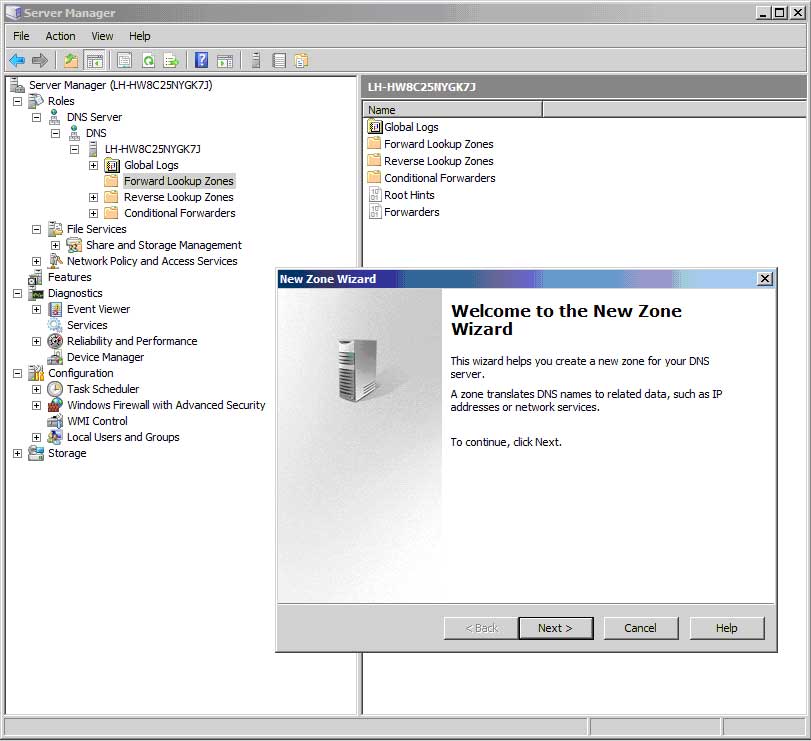
Just because your server roles are installed and the services are running doesn’t mean they will be configured. You’ll need to access the specific administrative tools for each role in order to do that. For example, you could now go to your Start menu, choose Administrative Tools, and see that the DNS console has been added. Although you may have to close and re-open Server Manager to get them to show up, Microsoft has integrated the role-specific consoles with Server Manager. Note in Figure 5 that the DNS console is now available under the Roles node in the navigation pane. You can fire up the New Zone Wizard by right-clicking the Forward Lookup Zones node and choosing New Zone, just as you would in the standalone DNS console.
The only problem I found with this feature is, unfortunately, a big one: Server Manager’s version of the DNS console won’t let you connect to a different DNS server like the standalone version of the DNS console. Right click the DNS icon in Server Manager’s navigation pane, and the “Connect to DNS Server” option is absent. (I had a moment of hope when I thought that installing the Remote Server Administration Tools would magically remote-enable Server Manager, but it was not to be.) Nothing’s perfect, but if Microsoft truly intends Server Manager to be a one-stop shop, the company will need to enable the tool for remote administration as well as local administration. Perhaps if enough of us send postcards to Steve Ballmer, our message will be heard.
Anyway, after the roles installation, you may be tempted to hunt for the Server 2008 version of the Server 2003 SP1 “Security Configuration Wizard” I mentioned earlier. This tool reduces the attack surface of a 2003 box by disabling services and ports that don’t seem to be needed by the discovered roles. With Longhorn, Microsoft claims that the role wizards are already designed for security. So although SCW is still there (see the Server Manager overview screen, open Server Summary, then open Security Information) for the purpose of creating a portable server security policy, there is less urgency to run SCW to tighten things down after a role has been installed. I haven’t tested this contention yet, but if true, it will be a welcome change from the old tradition of “install it first, secure it later.”
See last week’s posts:
Adding a role to WS2008: Easy as can be
The purpose of roles in Windows Server 2008
Meet Windows Server 2008 ‘Server Manager’ — your new management cockpit
The Look and Feel of Server 2008
Figure 5