Cisco Press
Posture agent overview
Cisco Trust Agent architecture
Posture plug-in functionality
Vendor application example: Cisco Security Agent
The two major functions of the NAC posture agent
The process for posture validation
The process for identity and posture validation
Posture plug-ins and the vendor namespace format
The posture plug-in contents of .dll and .inf files
The Cisco Trust Agent–supported host operating systems
Four benefits of using Cisco Security Agent (CSA) with NAC Framework implementations
Hosts connecting to the network
Network access devices (NADs) that serve as the policy enforcement point (PEP)
Policy servers that act as the policy decision point (PDP)
Posture agent plug-in file, which defines the host posture credential attributes
Cisco Trust Agent log file and the type of events captured, which are useful for troubleshooting host problems with NAC
Cisco Trust Agent (prior to Cisco Trust Agent version 2.0)
Cisco Trust Agent Event Logging Service (prior to Cisco Trust Agent version 2.0)
Cisco Posture Server Daemon (Cisco Trust Agent version 2.0)
Cisco Systems, Inc. Cisco Trust Agent Posture State Daemon (Cisco Trust Agent version 2.0)
Cisco Trust Agent EoU Daemon (Cisco Trust Agent version 2.0)
Cisco Trust Agent Logger Daemon (Cisco Trust Agent version 2.0)
Cisco Trust Agent 802.1X Wired Client (Cisco Trust Agent version 2.0)
Cisco Trust Agent 802.1X Wired Client Log (Cisco Trust Agent version 2.0)
Cisco Trust Agent can collect information regarding the host operating system through internal posture plug-ins and acts as a broker by collecting credentials from third-party host application posture plug-ins.
Cisco Trust Agent communicates to the NAD upstream with one of following protocols: Extensible Authentication Protocol over User Datagram Protocol (EAP over UDP, EAPoUDP, or EoU) and EAP over LAN (EAPoL), otherwise known as 802.1X.
Operating system posture assessment for the host
Client notification and default browser integration
Cisco Trust Agent Scripting Interface (CTASI)
EAP–Microsoft Challenge Handshake Authentication Protocol (MSCHAP) v2: Used for Microsoft Active Directory based on username and password credentials.
EAP–Transport Layer Security (TLS): Used with machine and/or user certificates.
EAP–Generic Token Card (GTC): Used with Lightweight Directory Access Protocol (LDAP) or one-time passwords like Rivest, Shamir, and Adelman (RSA) SecurID tokens for identity information and include the relevant posture information as type-length values (TLVs) in the exchange with the ACSs.
Communication with the NAD by either EAPoUDP or EAPoL (802.1X)
Communication with NAC-capable applications on the host
For Network Admission Control (NAC)–enabled hosts to be able to communicate their posture credentials to the posture server, a posture agent must exist on the host.
Cisco Trust Agent is the posture agent. It communicates with various NAC-enabled host applications by way of their posture plug-ins. NAC third-party vendors must build their own posture plug-ins to communicate their credentials to the policy decision points. Each vendor is identified by a unique vendor ID that identifies the vendor’s application type (for example, antivirus) and attributes (for example, version).
Cisco Trust Agent aggregates host posture credentials from all the NAC-enabled application plug-ins and communicates them to the network.
This chapter examines the role of hosts in NAC and describes how Cisco Trust Agent and NAC-enabled applications interoperate.
This chapter describes the following items:
Posture Agent Overview
As shown in Figure 3-1, three distinct roles exist within a NAC Framework solution:
Figure 3-1
Network Admission Control Logical Roles
Posture is the term that describes the collection of credentials and attributes that define the state or health of a user’s computer and the applications on that computer, which this book refers to as the host.
With NAC, a posture agent is required and resides on the host, or subject, and communicates information such as device operating system and application-level information, in the form of credentials.
The NAD forwards the host credentials for validation against the policy decision points (PDPs) of the NAC Framework solution. A policy decision is made and network enforcement instructions are sent by the Cisco Secure Access Control Server (ACS) to be enforced by the NAD.
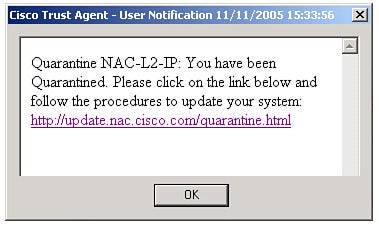
The posture agent also performs a variety of functions, such as informing the user by a custom configurable message notification that is sent to the user describing the posture condition of his host. The following is a notification example for a noncompliant host: “Your computer is lacking the necessary updates and therefore is not granted access to the network. In order to resume normal network access, please update your computer now at the following location.” In addition to the message notification, a notification string, such as a URL entry, can also be configured by administrators that automatically send a noncompliant host to a remediation server.
Additional actions exist and vary by vendor applications.
Cisco Trust Agent Architecture
The following sections describe these components of Cisco Trust Agent:
These sections also identify the operating systems that are supported by Cisco Trust Agent.
First, we walk you through the architecture of posture agents, beginning with the mandatory component, Cisco Trust Agent, as shown in Figure 3-2.
Figure 3-2
Cisco Trust Agent Architecture
Cisco Trust Agent resides on the host and runs in the background as a service. Services exist and vary by Cisco Trust Agent version. These services should be automatically started and running; they include the following:
If 802.1X is included, the following additional services should be running:
Cisco Trust Agent provides the following two major functions:
Note – For 802.1X implementations, Cisco Trust Agent does not communicate directly to the NAD. All EAP transactions occur from Cisco Trust Agent to the supplicant and to the NAD, and vice versa.
Cisco Trust Agent is available at no charge and can be downloaded by any registered user at https://cisco.com/cgi-bin/tablebuild.pl/cta. It can also come bundled with CSA as well as some third-party NAC vendor applications.
Cisco Trust Agent also has the following additional features:
Cisco Trust Agent includes two posture plug-ins of its own: one to report the status of the posture agent itself and one to report some basic information about the host that it’s running on. Each of these posture plug-ins returns a credential as part of the validation process.
Cisco Trust Agent can also launch a web browser at the conclusion of the validation process. This is enabled by placing a URL in the notification string of the corresponding ACS configuration for posture validation. A pop-up message might also be displayed by Cisco Trust Agent or other applications that have this functionality by populating the PA Message section of the Posture Validation section in the Network Access Profiles setup on ACS.
When arbitrary information about a host is needed to make a complete posture assessment, the CTASI can be used. A user script can write a formatted file that CTASI can read into Cisco Trust Agent’s internal database. This database is then sent as an additional credential for the posture decision-making process.
Cisco Trust Agent has two primary versions: one with an 802.1X supplicant and one without the supplicant.
Beginning with the core mandatory functionality, Cisco Trust Agent can operate solely for posture assessment using EoU with either version. By default, Cisco Trust Agent uses UDP port number 21862 for EoU communications. This port can be changed by editing the ctad.ini configuration file, which is described later in this section. Note that whichever UDP port is used, any host personal firewall must be modified to permit incoming traffic to this UDP port. Otherwise, Cisco Trust Agent will be unable to communicate NAC requests to the NAD, resulting in the host failing to authenticate and thereby receiving restricted access to the network.
Cisco Trust Agent can also gather identity and posture credentials simultaneously using the embedded, wired-only 802.1X supplicant.
Note – Cisco Trust Agent includes an 802.1X supplicant for wired interfaces only. For wired and wireless support, a third-party supplicant vendor can be engaged (such as Meetinghouse Data Communications, https://www.mtghouse.com).
With the NAC-L2-IP (EoU) method, the NAD detects a new host by way of DHCP or Address Resolution Protocol (ARP), where it queries the host, and if installed, Cisco Trust Agent responds to this query. At this point, the NAD signals the Cisco Secure ACS that it has a new host to be admitted to the network.
ACS and Cisco Trust Agent build a secure tunnel using Protected EAP (PEAP). PEAP requires the use of digital certificates. The PEAP tunnel is secured by way of a certificate presented by ACS during the establishment of the session. Because Cisco Trust Agent is installed with a root or intermediate root certificate, it trusts ACS and therefore builds a secure tunnel.
Note – For more information on the PEAP process, refer to the “NAC-L3-IP and NAC-L2-IP Posture Validation and Enforcement Process” section in Chapter 2, “Understanding NAC Framework.”
Note – When Cisco Trust Agent is installed, it must have either the ACS server’s certificate or a certificate in the chain of authority, either the root or an intermediate root certificate. For more information on installing and using digital certificates with Cisco Trust Agent, refer to the Cisco Trust Agent Administrator Guide located at https://www.cisco.com.
In cases where you want to evaluate user and/or device identity and posture credentials, you should use 802.1X.
The 802.1X technology can be used either with the embedded wired-only supplicant or a third-party supplicant. In this scenario, the Extensible Authentication Protocol–Flexible Authentication via Secure Tunneling (EAP-FAST) method must be used as the outer authentication method (at the time of this writing). The ability to handle multiple authentication types, for example, both user and machine identity and posture validation, in one authentication request is called credential chaining. EAP-FAST is currently the only EAP tunneling method that allows credential chaining. EAP-FAST is similar to PEAP in that it’s also a tunneled protocol that supports a variety of authentication methods. What’s different is that EAP-FAST does not require digital certificates like PEAP; it’s designed to run on nearly every host device and preferred by some customers who don’t want to use digital certificates.
Inner EAP types that can be used for identity authentication include the following:
For more on EAP-FAST, refer to https://www.ietf.org/internet-drafts/draft-cam-winget-eap-fast-06.txt.
In addition, user notifications are expressed by way of Cisco Trust Agent notification pop-ups, as shown in Figure 3-3, as well as by opening the host’s default browser to a URL.
User Notification Example of a Quarantine Condition
All of this information is expressed in the admission control policy, as configured in ACS.
In summary, the Cisco Trust Agent performs the following two mandatory functions:
Posture Agent Plug-in Files
Cisco Trust Agent includes two posture assessment capabilities: gathering its own posture information and gathering posture details from the host, such as operating system information through internal posture plug-ins.
The following is an example of an .inf file from Cisco Trust Agent’s posture plug-in, or ctapp.inf, file:
 [main]
PluginName=ctapp.dll
VendorID=9
VendorIDName=Cisco Systems
AppList=pa

[pa]
AppType=1
AppTypeName=CtaEoU
AttributeList=attr1,attr2,attr3,attr4,attr5,attr6,attr7,attr8
attr1=1,notify,AppPostureResult
attr2=2,notify,SysPostureResult
attr3=3,string,AppName
attr4=4,version,AppVersion
attr5=5,string,OSName
attr6=6,version,OSVersion
attr7=11,Unsigned32,CTAState
attr8=7,notify,UserNotify
The following is an example of Cisco Trust Agent’s host posture plug-in, or CiscoHostPP.inf, file:
[main]
PluginName=CiscoHostPP.dll
VendorID=9
VendorIDName=Cisco Systems
AppList=CiscoHost

[CiscoHost]
AppType=2
AppTypeName=Host Posture Plugin
AttributeList=attr6,attr7,attr8
attr6=6,string,ServicePack
attr7=7,string,HotFixes
attr8=8,string,SystemName
You can see the attributes or credentials that these Cisco Trust Agent plug-ins gather for evaluation. Other NAC posture plug-ins are similar in how they are organized. However, the specific attributes differ by application.
A posture plug-in can also act on messages received from ACS at the conclusion of the posture validation process. These messages take two forms. One is a pop-up message that is displayed on the host’s screen, informing the user of the posture validation results and optionally including an active URL. The second is a notification string that can be sent as a result of the validation process. This notification string can launch the default web browser on the host or can trigger the posture plug-in to begin a remediation process such as the update of an antivirus signature file. The actions triggered by the notification string vary according to the specific security application that the posture plug-in is associated with.
Cisco Trust Agent Logging
Cisco Trust Agent has logging capabilities that are extremely useful for troubleshooting NAC events. However, they are disabled by default (at the time of this writing).
To enable logging, go to the Cisco Trust Agent configuration directory on the host where Cisco Trust Agent is installed. The Cisco Trust Agent log file is located by default at C:Documents and SettingsAll UsersApplication DataCisco SystemsCiscoTrustAgent.
Rename the ctalogd.tmp file to ctalogd.ini. The log file is then created in the Logs subdirectory as soon as the Cisco Trust Agent receives the next EAPoUDP/EAPoL request. If the log file is not created, either you didn’t rename the file correctly or the Cisco Trust Agent is not receiving EAPoUDP/EAPoL requests, which can be caused by a personal firewall blocking the requests or Cisco Trust Agent port from the NAD. Logging can also be enabled and configured through the command-line program clogcli.exe.
At the time of this writing, the default maximum log size is 4 MB and can be changed by editing the ctalogd.ini file. When the maximum log size is reached, a new log file is created. Over time, an unlimited number of files are created.
For information about log files or how to customize them, refer to the “Cisco Trust Agent Event Logging” section of the Cisco Trust Agent Administrator Guide located at https://www.cisco.com.
Operating System Support
As of this writing, Cisco Trust Agent supports the Windows and Red Hat Linux (Enterprise, Advanced, and Workstation, versions 3.x and 4.x) operating systems. Additional platform support for Microsoft Windows Mobile 5 and Windows XP Tablet, Sun Solaris, and Apple Macintosh OS X is anticipated.
As you saw from the two plug-ins described earlier (ctapp.inf and CiscoHostPP.inf), Cisco Trust Agent can gather the following information on a Windows NT 4.0, Windows 2000, or Windows XP system:
Operating system name (for example, Windows XP Professional)
Operating system version (for example, Version 2002)
Operating system service pack (for example, Service Pack 2)
Operating system hot fixes (for example, KB123456, KB234567, and so on)
Machine name (for example, the host Fully Qualified Domain Name [FQDN])
Cisco Trust Agent information:
Posture agent name (for example, Cisco Trust Agent)
Posture agent version (for example, 2.0.0.30)
Machine posture state (for example, booting versus logged in)
For Red Hat Linux, Cisco Trust Agent can collect the following information:
Selected Red Hat Package Manager (RPM) versions
Operating system type (for example, Red Hat Enterprise Linux ES)
Operating system (OS) release (includes OS kernel name, version, and hardware platform)
Kernel version (same as output of uname –r)
Cisco Trust Agent information:
Posture agent name (for example, Cisco Trust Agent)
Posture agent version (for example, 2.0.0.30)
Machine posture state (for example, booting versus logged in)
The Linux host posture plug-in can retrieve the version number of certain packages, but these packages must be predefined in the ACS policy. Be aware that the Linux RPM version format is inconsistent when requested as a string or an octet. The following are examples of how the version number can appear. Cisco Trust Agent returns a package version number using a special format.
The first example is a posture validation rule configured in ACS that requests the version number of the OpenSSL package. When requested as a string, the version number is returned as a combination of numbers and letters, such as 0.9.7a.
The second example is when requested as a 4-octet number; the version number returned might be 0.9.7.97.
Note – Cisco Trust Agent for Linux does not support the retrieval of the host’s FQDN.
Cisco Trust Agent, in combination with posture plug-ins and, optionally, with various third-party host applications, can deliver a deep view into the security policy compliance of a business’s fleet of hosts.
Posture Plug-in Functionality
Posture plug-ins gather data from various security applications or host operating systems in a format that is acceptable for transmission to the posture agent, Cisco Trust Agent.
A critically significant aspect of the NAC Framework approach is its ability to intelligently integrate into third-party applications. As part of the Cisco NAC Partner Program (more information is available at https://www.cisco.com/en/US/partners/pr46/nac/partners.html), vendors of host antivirus, endpoint security, compliance and audit, and remediation and patch management products use Cisco Trust Agent to deliver credentials specific to their solution for validation against a comprehensive access control policy. Third-party security and compliance solutions can now use the ubiquitous presence of the network as a powerful enforcement point, and thereby deliver a significant extension on the customer’s existing capital and operational investment in that application.
Each NAC vendor’s posture plug-in is assigned a vendor ID by way of Internet Assigned Numbers Authority (IANA). A list of IANA assignments can be found at https://www.iana.org/assignments/enterprise-numbers.
Within that identifier, the vendor can implement a per-application type, followed by the various attributes that the vendor would like evaluated for admission control policy validation. The NAC vendor must follow a specific format or namespace as follows:
Vendor:Application-Type:Attribute
Refer to Table 3-1 for a list of credentials available from the host at the time of this writing. The list can vary depending on the installed posture agents.
Table 3-1 Credential Attributes
| Application | Vendor | Application Type | Attributes |
|---|---|---|---|
Cisco Trust Agent | Cisco | Posture agent (PA) | PA-Name PA-Version OS-Type OS-Version OS-Release OS-Kernel-Version Machine PostureState |
Cisco Trust Agent | Cisco | Host | Service Packs HotFixes HostFQDN |
CSA | Cisco | Host-based intrusion prevention system (HIPS) | CSAMCName CSAOperationalState CSAStates CSAVersion TimeSinceLast Successful Poll |
Other | Various | Antivirus, personal firewall (PFW), and so on | Software-Name Software-ID Software-Version Scan-Engine-Version DAT-Version DAT-Date Protection-Enabled PFW-policy-version |
In Windows versions, every Cisco NAC vendor must create the following two files that interoperate with Cisco Trust Agent:
.dll—Links Cisco Trust Agent and the host application that in effect makes it a posture agent. The .dll file contains the application code for its specific plug-in actions that works with the application’s notification string.
.inf—Describes the various attributes available from the vendors plug-in. These are typically located in one of the following host directories:
For Cisco Trust Agent v1: C:Program FilesCisco Systems
For Cisco Trust Agent v2 or greater: C:Program FilesCommon FilesPostureAgentPlugins
When a NAC vendor’s credential is sent from the host to ACS, ACS must be capable of understanding it. To accomplish this, ACS must contain the partner attribute definition files (ADFs) that are specific to that NAC vendor. These ADFs can be imported into the ACS dictionary by using the CS-Util tool. Refer to version 4.0 of the Cisco Secure ACS Configuration Guide, located at https://www.cisco.com, Technical Documents for Cisco Security. An additional function of posture plug-ins is status change notification. When the associated security application completes a remediation process, such as receiving an updated signature file for an antivirus program, the posture plug-in can signal Cisco Trust Agent that a status change has occurred. When Cisco Trust Agent has been installed with a supplicant in NAC-L2-802.1X mode, Cisco Trust Agent can signal the supplicant to send an EAPoL start packet to the NAD. This triggers the initiation of a normal authentication sequence by the NAD. This feature is currently only available with a supplicant operating in NAC-L2-802.1X mode and is called asynchronous status query. When operating in NAC-L2-IP or NAC-L3-IP mode, the host must wait to receive a status query before triggering a revalidation.
Vendor Application Example: Cisco Security Agent
Many NAC-enabled vendor applications provide capabilities that can interoperate with NAC, thus extending the value of the existing application investment into a wider range of solutions. An example is Cisco Security Agent (CSA). CSA contains its own posture plug-in files, enabling it to send a credential to the NAC solution.
CSA provides the following four benefits to complement a NAC Framework solution:
Cisco Trust Agent protection
NAC state awareness
Trusted quality of service
Efficient mass deployment of Cisco Trust Agent
Cisco Trust Agent Protection
CSA is a behavioral-based host intrusion prevention product. It focuses on protecting the host asset and the intellectual property that resides on that asset, per its configured security policy.
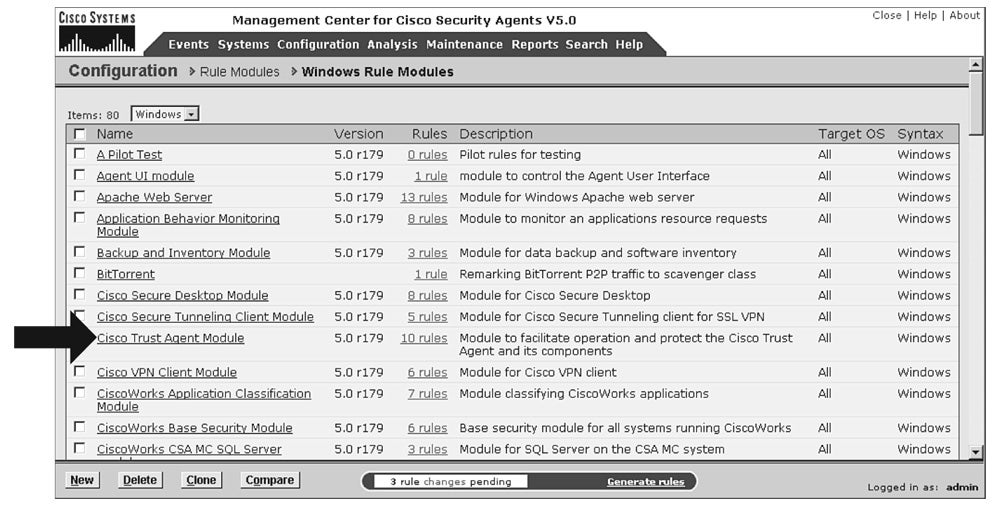
In CSA versions 4.5.1 and 5.0, prebuilt rules exist that focus on two important functions: permitting Cisco Trust Agent to function as intended and protecting Cisco Trust Agent from outside interference. This interference could be caused by either a user mistake, such as uninstalling Cisco Trust Agent, or by intention, such as a worm attempting to spoof credentials. As shown in Figure 3-4, CSA has rules that permit Cisco Trust Agent to communicate with the network, open notification messages on the user’s desktop, and open the default browser and pass a URL for remediation. CSA also has a rule that prevents modification of the Cisco Trust Agent files and the posture plug-in file folder.
CSA Management Center: Cisco Trust Agent Rule Module
NAC State Awareness
Because Cisco Trust Agent and CSA can be installed on a host together, in this case, CSA also serves as a posture agent. As part of the integration, CSA can also see the system posture token (SPT) that is passed to Cisco Trust Agent from ACS. This allows CSA to dynamically change its specific host security policy in accordance with the admission control assessment.
Integrating host security functionality and port-based access control gives IT operations the capability to implement a policy that locks down noncompliant hosts so that only specified applications are allowed to run, and to only contact specific resources on the network. For example, IT operations can implement a policy that only permits remediation processes to run and only permits the default web browser to go to a narrow list of internal web resources.
Trusted Quality of Service
Providing a policy enforcement agent on the endpoint allows businesses to intelligently shift the trust boundary of the network into the host. This trust boundary depends on the admission control result. This type of solution is called Cisco Trusted Quality of Service (QoS).
Cisco Trusted QoS is valuable for two reasons. Because CSA can identify and secure known applications, it can properly mark the traffic from those applications with the appropriate Differentiated Services Code Point (DSCP) values (in accordance with corporate IT policy). This can be significant because traffic egressing onto the wide-area network will not need to be inspected, lessening the resource burden on the edge devices. In addition, because this policy is dynamic, the QoS policy within the company in question can adapt extremely quickly to new demands.
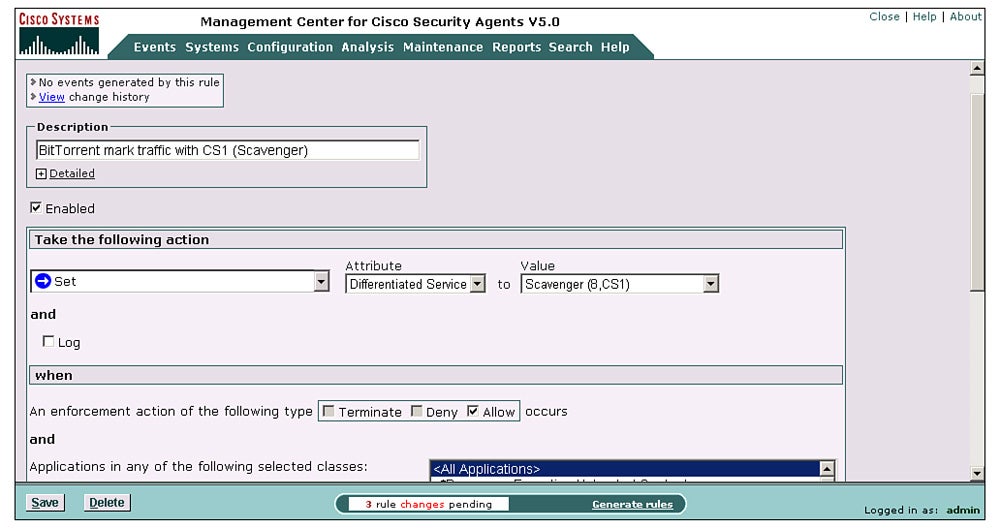
The other reason that Cisco Trusted QoS is important is that by virtue of the fact that you are discovering and marking traffic based on CSA’s identification of known applications, you can now discover and mark all the application traffic that does not conform to your policies. As shown in Figure 3-5, the Management Control Center for Cisco Security Agent allows administrators to configure Differentiated Service enforcements.
CSA Management Center: Trusted QoS
As shown here, the administrator marks certain traffic to be a Scavenger class (Differentiated Service Scavenger (8,CS1)) and selectively drops it if it exceeds a certain rate. Even more interestingly, questionable traffic can selectively be routed through upstream security devices by using other routing and switching functions, such as policy-based routing, virtual routing and forwarding (VRF), or Cisco Optimized Edge Routing (OER). This can greatly decrease the utilization on these security devices, because they would only be inspecting and enforcing questionable traffic versus all traffic.
For more information on Trusted QoS, refer to the Cisco Security Agent Management Center (CSA MC) documentation located at https://www.cisco.com/univercd/cc/td/doc/product/vpn/ciscosec/csa/csa50/trqos.pdf.
Bundling Cisco Trust Agent for Deployment
A final CSA benefit is to use the CSA MC to import and install the Cisco Trust Agent along with CSA onto hosts automatically. This can be done by associating installation options such as a silent install with the supplicant and the required certificate into the CSA build kit process. This allows the operator to bundle and even update Cisco Trust Agent on any host that has CSA installed. An example of how to select this bundling option in CSA MC is shown in Figure 3-6.
Figure 3-6
CSA Management Center: Cisco Trust Agent Bundling
Bundling Cisco Trust Agent with CSA installation can represent a significant operational time savings, as well as decrease the interruption on the part of the user community.
Summary
Cisco Trust Agent is the NAC posture agent that is a fundamental component of NAC Framework providing the following two major functions:
Acts as a broker, communicating with the NAC-enabled host applications and gathering credentials
Communicates with NADs by way of EAPoUDP or EAPoL (802.1X)
Cisco Trust Agent communicates with various NAC-enabled host applications by way of their posture plug-ins. NAC third-party vendors must build their own posture plug-ins to communicate their credentials to the policy decision points. Each vendor is identified by a unique vendor ID that includes identifying its application type (for example, antivirus) and attributes (for example, version). ACS must be able to understand the NAC vendor’s credentials. You might need to import partner attribute definition files (ADFs) into the ACS ADF dictionary.
Cisco Trust Agent also acts as a vital communication tool to users by informing them by way of message notifications in the form of pop-ups. It also guides users into remediation by the use of their web browser and URL redirections.
The presence of NAC-enabled applications and posture agents, in conjunction with the network access devices and the policy validation servers, allows the network to intelligently evaluate and enforce a security compliance policy anywhere in the network.
Resources
Network Admission Control EBC Presentation, Russell Rice, Director of Marketing, STG, Cisco Systems, Inc.
Network Admission Control Technical Frequently Asked Questions, https://wwwin.cisco.com/stg/nac/nac_technical_faq.shtml#anchor4.
Review Questions
You can find the answers to the review questions in Appendix A.
Cisco Trust Agent includes an 802.1X supplicant for which type of interfaces?
Any type of access interface
Only wired interfaces
Wired and wireless interfaces
All Layer 2 and Layer 3 interfaces
How is the protected EAP tunnel established between ACS and Cisco Trust Agent?
Both use a shared secret password only.
Choice of using either a shared secret password or certificate.
Cisco Trust Agent presents a certificate to ACS.
ACS presents a certificate to Cisco Trust Agent.
When evaluating identity and posture credentials, which EAP type must be used with 802.1X?
EAP-FAST
Protected EAP
EAP-TLS
EAP-GTC
Cisco Trust Agent communicates directly with which two NAC components?
NAD
ACS
NAC-enabled applications posture plug-in
Posture agents
Which type(s) of NAC vendor file is located in the host directory C:Program FilesCommon FilesPostureAgentPlugins?
.dll
.log
.exe
.inf
Which common filenames are assigned to the two posture agent plug-ins?
ctapp.inf
CiscoHostPP.inf
CiscoHostPP.dll
ctaapi.dll
ctapp.dll
Which of the following statements is false?
A benefit of using CSA with NAC is that it can protect Cisco Trust Agent from being altered.
CSA MC allows the ability to install Cisco Trust Agent and required certificates along with the CSA quiet install.
CSA can discover and mark application traffic with DSCP values.
CSA is a posture agent and does not require the use of Cisco Trust Agent.
Copyright © 2007 Pearson Education. All rights reserved.